Version 2.0

Effective date:

Apr 28, 2026

Release notes: Workflow and reporting

Workflow and reporting: Version 10.0

New Features

  1. Improved Stability During AI‑Assisted Reporting 

What’s New: 

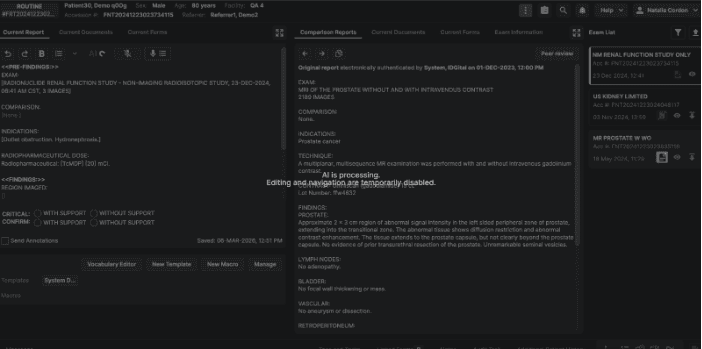
  • We’ve improved the reliability of AI‑assisted report corrections by preventing edits while AI processing is in progress. 

  • Previously, if a user-initiated AI corrections and then modified the report (for example, by inserting a comparison study or editing content) before AI processing is completed, the system could place AI‑generated text in the wrong location. This could result in formatting issues, overwritten content, or inconsistent report structure. 

Impact: 

While AI processing is running: 

  • The reporting screen is temporarily locked 

  • “AI is processing” message is displayed 

  • Editing, navigation, and insertion actions are disabled 

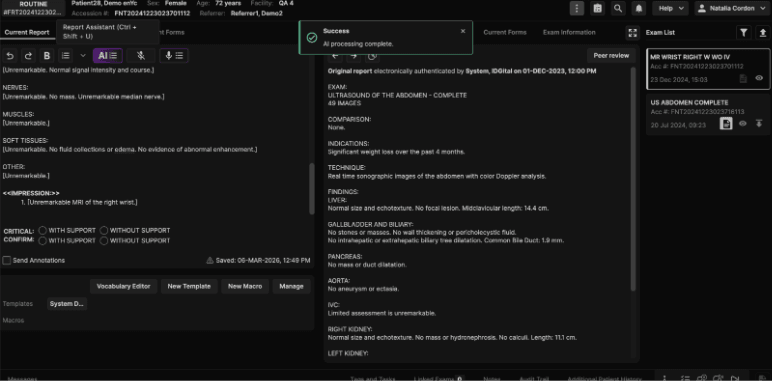
Once AI processing completes (or if it fails), the screen is automatically unlocked and normal interaction resumes. 

  1. Reset Local Cache

Users can now manually clear the viewer's local image cache directly from within the application. This provides a self-service resolution path for image loading and synchronization issues without requiring support intervention. 


Note: This option is available to Radiologist user roles only.  

How to Use

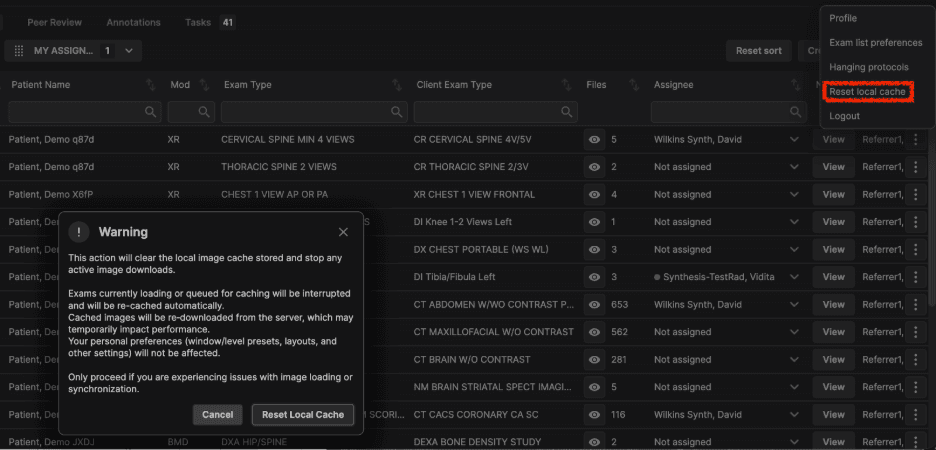
  • Open the user profile dropdown menu in the top navigation. 

  • Select "Reset local cache." 

  • Review the warning dialog and confirm by clicking "Reset Local Cache" (highlighted by default — press Enter to confirm), or dismiss by clicking "Cancel." 

What Happens on Confirmation 

  • The local OPFS cache directory, and all Indexed DB entries are cleared. 

  • Any exams currently loading or queued for caching are interrupted and will be re-cached automatically. 

  • Cached images will be re-downloaded from the server; a temporary impact on image load performance may be observed during this period. 

  • The application reloads and reinitializes into a clean state. 

What Is Not Affected 

  • Personal preferences — including window/level presets, layouts, and other viewer settings — are not modified by this action. 

This tool is intended for use when experiencing issues with image loading or synchronization.  


Note: Clearing the local cache may take several minutes. Do not refresh or close the browser until the process is complete. The worklist remains accessible during this time. 

  1. PowerScribe Integration

This release introduces native integration with PowerScribe as an external reporting and dictation platform, enabling radiologists to dictate and sign reports directly in PowerScribe while the Workflow and Reporting Platform automatically manages study status, assignment, and report synchronization.

What’s new: 

  • PowerScribe launches automatically when a radiologist opens a study (based on permissions and assignment). 

  • Reporting and signing are performed entirely in PowerScribe; native sign actions in the platform are hidden when the integration is enabled. 

  • Study lifecycle is automatically synchronized across systems:  

  • Studies move to Completed upon signing in PowerScribe. 

  • An “In Processing” status appears while the final report is in transit. 

  • Studies update to Final once the finalized report is received via HL7 from the EMR. 

  • Context synchronization ensures PowerScribe always opens in the correct patient and study context. 

  • Built‑in safeguards prevent double dictation by clearly indicating when a study is in use. 

Important notes: 

  • PowerScribe integration is configured at the facility level. 

  • Requires PowerScribe, the platform native application (Vault), and Display Manager to be installed on supported Windows workstations. 

  • Study remains locked between signing and receipt of the final HL7 report. 

  1. Advanced Visualization (AV) Tool Integration - Integrated Launch for Canon Vitrea and TeraRecon 

This release adds Advanced Visualization (AV) integration, allowing radiologists to launch supported third-party AV tools directly from within the Workflow and Reporting Platform with full patient and study context automatically applied. 

What’s new: 

  • Seamless in-context launch of Canon Vitrea and TeraRecon from the reporting screen. 

  • A new “Launch In” menu appears when AV tools are enabled for a facility. 

  • Patient and study context is passed automatically — no manual search or reloading required. 

  • Radiologists can keep the default viewer open while working in the AV tool in a separate window. 

  • Derived images and outputs created in the AV tool are returned and stored with the exam record. 

Important notes: 

  • AV integration is configured at the facility level and supports enabling one or both tools. 

  • Requires the AV application, native platform application (Vault), and Display Manager extension to be installed on Windows workstations. 

  • If an AV tool is not installed locally, the launch option will be unavailable or return an error. 


Improvements and Fixes

Exam Linking, Locking and Lifecycle Stability 

Improved consistency of exam locking, linking, and lifecycle transitions, especially in split/merge scenarios.

  • Fixed cases where linked exams did not lock/unlock correctly when one of the linked exams was opened or closed.  

  • Resolved exams remaining locked after split or merge operations.  

  • Fixed incorrect behavior where cloned exams inherited final reports from the source exam.  

  • Ensured completed exams return to the correct state after support request resolution. 

Documents, Forms and External Content 

Improved document handling and form rendering for downstream systems. 

  • Fixed issues where technical forms rendered as blank images when exported to external PACS. 

  • Fixed errors when sharing exams with reports and image links from the Inflight tab. 

Search, Matching and Data Integrity 

Enhanced data accuracy, matching behavior, and search reliability. 

  • Fixed incorrect parsing of Accession Number into MRN when uploading DICOMs from.  

  • Fixed multiple issues in exam-to-image matching workflows, including partial and unmatched exams. 

Security, Access and Platform Reliability 

Improved platform resilience, access control, and error handling.

  • Fixed misleading login error messages for invalid email entries. 

  • Prevented backend outages caused by malformed regex rules during order processing.

  • Improved system stability under edgecase conditions in exam list and API responses.